The convenience of buying digital goods is undeniable. With a single click, you can instantly gain access to complex software, beautifully designed templates, educational e-books, or high-end graphics. Because delivery is immediate, it completely eliminates the traditional friction of shipping times and physical inventory.
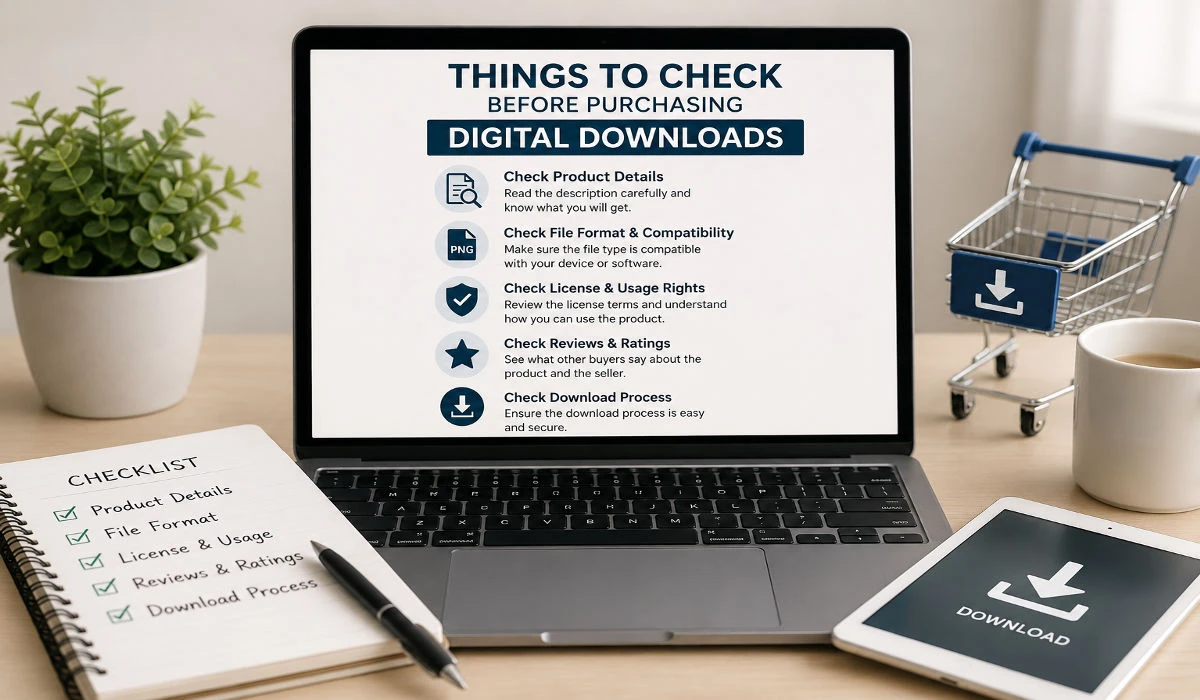
However, instant delivery comes with a significant catch: you cannot return a digital file once it has been saved to your drive. Unlike physical items, where a customer service team can easily send a return shipping label, digital transactions are almost always final. This means that your pre-purchase research acts as your only line of defense. Knowing the exact Things to Check Before Purchasing Digital Downloads is crucial if you want to avoid technical frustration, broken code, and unresponsive customer service.
This support-oriented guide will walk you through the essential customer care checkpoints, technical verifications, and documentation reviews you must perform before hitting the checkout button.
The Anatomy of Modern Digital Support
When most buyers think about customer support, they imagine reaching out after something breaks. However, in the digital asset space, top-tier support leaves clues before you buy.
Before spending your money on a marketplace like Etsy, Gumroad, or Creative Market, take a moment to look at how the seller interacts with their existing community. Are they answering public troubleshooting questions? Do they provide a clear way to contact them if the file fails to unzip? A creator who hides their contact information or leaves user complaints unanswered in the comment section will likely abandon you if you encounter a technical bug.
Checking the Documentation and Onboarding Materials
One of the most critical Things to Check Before Purchasing Digital Downloads is the presence of an installation or onboarding guide.
Premium digital products are rarely delivered as a single, loose file without context. High-quality creators understand that users have varying levels of technical expertise. Therefore, they include comprehensive documentation to support your journey.
- Look for “Read Me” Files: Check the product description to see if the seller includes an instruction manual, a setup checklist, or a troubleshooting PDF.
- Video Walkthroughs: For complex digital assets like website themes, automated Notion dashboards, or software plugins, check if the seller links to a public video tutorial showing exactly how to configure the product. If no documentation is mentioned, you run the risk of buying a file you don’t know how to use.
Verify System and Software Compatibility
A major reason buyers submit urgent support tickets is that they accidentally purchased a file that is fundamentally incompatible with their current setup. Software version mismatches can render even the most beautiful asset completely useless.
When compiling your checklist of Things to Check Before Purchasing Digital Downloads, always cross-reference these technical parameters:
A. Software Ecosystem Requirements
Ensure the file format perfectly matches the application you plan to use. A presentation template built exclusively for Apple Keynote will not import correctly into Microsoft PowerPoint. Similarly, a vector graphic saved only as an Adobe Illustrator (.AI) file will be incredibly difficult to edit if you only use Canva.
B. Version Compatibility
Digital tools update rapidly. A WordPress theme or a design asset built three years ago might completely break when run on modern 2026 software versions. Look closely at the “Last Updated” metadata on the sales page. If the file has not been updated or tested against recent software patches, it represents a massive technical liability for your workflow.
Read More: How to Choose the Right Digital Product Before Buying
Side-by-Side Support Evaluation Prior to Checkout
Evaluating the customer care infrastructure of a seller is one of the most critical steps when analyzing your checklist of things to check before purchasing digital downloads. A reliable, high-support creator makes themselves easily accessible by offering professional contact channels such as a dedicated support email, an organized ticketing system, or an active community Discord link. Furthermore, they protect your workflow by explicitly promising a reasonable response timeframe—usually between 24 to 48 hours—so you know exactly when to expect technical assistance if a file encounters an error. To minimize post-purchase friction, these safe-buy creators feature an extensive, publicly accessible FAQ section directly on their sales page to answer common installation mistakes. Finally, their attention to detail shows in the file delivery itself; instead of a chaotic mess, they provide a cleanly labeled, well-structured ZIP folder containing clear internal documentation.
Conversely, a low-support creator introduces massive technical and financial risks to your project, making their storefront a highly dangerous option. These sellers provide zero direct contact methods, forcing you to rely entirely on standard, unmonitored marketplace messaging systems that often lead to dead ends. They make absolutely no commitment to communication response times, frequently leaving urgent technical inquiries unanswered for weeks at a time. You will also notice a complete absence of troubleshooting guides or FAQ resources on their landing pages, leaving you to figure out complex file configurations entirely on your own. To make matters worse, a major red flag of a low-support storefront is a completely unorganized dump of generic, poorly named files that lack any form of introductory installation text, significantly increasing the chances of data compatibility issues.
Reviewing the Refund and Dispute Policy
Because digital items cannot be physically recovered, standard consumer return laws rarely apply. Therefore, reviewing the store’s refund policy is one of the non-negotiable Things to Check Before Purchasing Digital Downloads.
Understanding “All Sales Are Final”
The vast majority of indie creators and digital storefronts enforce strict no-refund rules to protect themselves from buyers who download an asset, copy it, and then immediately demand their money back. However, a fair digital policy should outline clear exceptions.
Look for statements that promise a refund if:
The digital file is completely corrupted and will not open.
The product description explicitly lied about features or software compatibility.
The seller is completely unable to solve a technical issue within a reasonable timeframe.
If a seller’s policy is overly aggressive and states they will never issue a refund under any circumstances—even if the file is broken—it is a strong indicator that you should look for an alternative provider.
Sifting Through Support Reviews
When analyzing user reviews, do not just look at the overall star rating. Instead, read the feedback specifically through a problem-solving lens.
When searching for the right Things to Check Before Purchasing Digital Downloads, look for reviews that mention how the creator handles technical difficulties. Feedback like, “I had trouble importing the template, but the seller replied within an hour and walked me through the fix,” is worth its weight in gold. Conversely, if you notice 5-star reviews for the design but multiple 1-star reviews stating, “The file wouldn’t download and the seller ignored my emails,” walk away from the transaction immediately.
File Delivery and Long-Term Access Security
The final support checkpoint revolves around how you will actually access your files over time. Hard drives fail, computers get replaced, and local files occasionally get deleted by accident.
Therefore, a vital component of the Things to Check Before Purchasing Digital Downloads is confirming whether you receive lifetime access to a cloud dashboard.
- Marketplace Hosting: Buying through established platforms ensures that your purchase history is tied to an account, allowing you to redownload the file whenever you need it.
- Direct Email Delivery: If you buy from an independent blog that sends the file as a direct, one-time email link, verify if that link expires. If the link expires after 24 hours, you must manually back up that file to an external drive or a personal cloud service immediately upon receipt to protect your investment.
Analyzing File Extraction and Archive Formats
A hidden technical hurdle that many buyers overlook is the actual format of the compressed files they receive. When compiling your checklist of Things to Check Before Purchasing Digital Downloads, you must pay close attention to how the data is packed. If a seller uses rare or highly encrypted compression formats without detailing the required unzipping software, you might find yourself locked out of your purchase entirely.
Understanding the Things to Check Before Purchasing Digital Downloads means verifying whether the files are delivered in standard, universally compatible archives like .ZIP or .RAR. For example, if you are downloading a heavy asset library on a mobile device or a basic tablet, certain multi-part archive formats might fail to extract without advanced third-party apps. Ensuring that the seller explicitly mentions standard compression methods in the product specifications will prevent your inbox from being filled with failed extraction errors.
Pre-Purchase Bandwidth and Storage Audits
The physical reality of digital assets is that they require local storage space and a stable internet connection to transfer successfully. Therefore, one of the most practical Things to Check Before Purchasing Digital Downloads is the final uncompressed file size compared to your available drive space. High-end graphic bundles, video templates, and software development kits can easily exceed several gigabytes in size.
If you fail to review the Things to Check Before Purchasing Digital Downloads regarding storage, you might download a massive file that crashes your system or exhausts your monthly internet data cap. Reliable creators will always state both the download size and the expanded disk space required to run the product smoothly. Checking these numbers before checking out guarantees that your hardware can actually support the workflow you are investing in.
Evaluating the Longevity and Independence of the Creator Platform
A final, long-term security measure to include in your checklist of Things to Check Before Purchasing Digital Downloads is the stability of the platform hosting the file. In the e-commerce landscape, small independent marketplaces or personal portfolio blogs can close down overnight. If you purchase a file from an unstable source, you risk losing access to your download history and future patches entirely.
When mastering the Things to Check Before Purchasing Digital Downloads, always look at whether the seller relies on an established Merchant of Record (like Gumroad, Lemon Squeezy, or Shopify) or if they are hosting the download links on a private, unverified server. Major platforms guarantee that even if a creator’s individual site goes offline, your customer account dashboard remains accessible to fetch your digital assets. Verifying platform security before finalizing your transaction ensures that your digital toolkit remains fully backed up and secure for years to come.
Final Transaction Security Check
The last item on your list of Things to Check Before Purchasing Digital Downloads is the safety of the checkout page itself. Always ensure the URL has a secure HTTPS padlock icon and utilizes a reputable payment processor like Stripe or PayPal. Taking three seconds to verify this security layer before completing your transaction ensures your personal financial data stays completely protected.
Checking File Access Expiration Dates
One more critical item among the Things to Check Before Purchasing Digital Downloads is whether your download link has a strict time limit. Some independent storefronts automatically deactivate delivery links 24 to 48 hours after a purchase to prevent file sharing. Reviewing this detail before checking out ensures you save the files to your local drive or cloud storage immediately, preventing you from getting locked out of your investment.
FAQ
Q1. What should I do if a digital file fails to download or un-zip after purchase?
Ans: First, check your internet stability and clear your browser cache. If the folder says it is “corrupted,” it usually means the download was interrupted before completion. If downloading a second time does not fix the issue, immediately contact the seller via their official support channel with a screenshot of the error code.
Q2. Is it safe to give my email to independent digital product sellers?
Ans: If the seller uses a secure checkout handler (such as Stripe, PayPal, or a certified Merchant of Record like Gumroad), your financial data is completely safe. However, ensure you read their privacy checkbox to verify that they won’t sell your email address to third-party marketing networks.
Q3. Why do some digital downloads require external activation keys?
Ans: For premium software plugins and high-end digital assets, creators use activation keys to prevent mass piracy. Before buying, make sure the description clearly explains how many devices or websites a single license key can support.